

David Zeuthen announced on the fedora-devel-list that it was the time to get more serious about having a LiveCD for Fedora Core 6 along the usual Fedora release processes: "..during the Fedora Summit it was decided that it was time to get more serious with having Live CD's as part of the Fedora release processes. Part of this includes building a Live CD with software from Core 6 and Extras 6. I've created a Wiki page for tracking this work (feel free to contribute)."
The primary goal of this LiveCD will be to do a hard disk install from the CD without requiring network connectivity: "I've got the "install to hard disk" feature done but at this point only as a proof of concept...The plan is to completely integrating Live CD creation into the Fedora release process including daily Live CD builds of Rawhide. Then we can start doing the "install to hard disk" feature." -says David Zeuthen in a recent email. This LiveCD will also contain all the updates of Fedora Core 6 and software from the Extras repository.
Highlights of this LiveCD:
• Read-write rootfs so it's possible to install software while the livecd is running.
• Use SELinux in enforcing mode and other security features by default.
• Stay as close as possible to a normal desktop install.
• Ability to fit on normal CD-ROM and CD-R media (less than 700MB).
• Included best of breed software on the media.
• Make it easy to do a derived livecd with your own repositories, packages and art work.
You can read more about Fedora Core 6 LiveCD here.
Thursday, December 14, 2006
 Fedora Core 6 Live CD on track


Skype 2.2 for Windows Mobile released in beta

Skype announced the release of the beta version of Skype 2.2 for Windows Mobile. The new version now supports smartphones powered by Windows Mobile, as well as an increased number of Pocket PCs. The full list comprises more than 120 supported devices.
"Skype for Windows Mobile gives our users more freedom to use Skype on the go and is key to our mobility strategy," said Eric Lagier, Head of Business Development, Mobile. "We’ve now added support for smartphones and expanded the range of supported Pocket PCs. In fact, over 90 percent of Windows Mobile devices with WiFi can now run Skype software. We’re absolutely delighted that millions of more people can have Skype conversations on the move and without a computer in sight."
"Microsoft’s Windows Mobile software is well suited to prosumer, feature rich devices," said David McQueen, Principle Analyst at Informa Telecoms and Media. "We estimate that Windows Mobile powered handset sales will continue to be strong in Europe and increase significantly in North America from late 2006. By 2011 it will be the most popular handset OS in that region and Skype is well positioned to shape the market."
The key features of Skype 2.2 for Windows Mobile beta include:
• Support for Windows Mobile smartphones and more Pocket PC devices; • Enhanced today screen: presence status, event notification (missed calls, new chat messages and voicemails);
• Proxy support: Supports regular HTTP or HTTPS proxies, and authenticating HTTPS/SSL and SOCKS5 proxies;
• Skype calling features: Free Skype-to-Skype calls, support for SkypeOut, SkypeIn, voicemail and call forwarding;
• User-friendly look and feel: As easy and familiar as using Skype on a computer, the software includes an enhanced SkypeOut dial pad;
• One-click Skype access: A Skype icon on the home screen lets users view and call contacts easily;
• Multi-person chat: Users can have multichat sessions using animated emoticons. When mobile users are offline, chat messages will automatically update the next time user logs in;
• Enhanced contact list: Users can see their contacts avatars and mood messages;
• Profile personalization: Users can take a picture with the camera on their mobile device and immediately update their profile.
What is codename 'Casino' in Microsoft space?
Casino is the codename of a Microsoft project designed to deliver the next generation Windows search experience. During the developing stages, Microsoft considered releasing Casino under the Windows Live Brand umbrella. In this context, Casino was referred to as Windows Live Search Center, Windows Search Preview and Windows Live Desktop Search. Because Microsoft renounced the plans to make Casino a Live project, there have been reports that it had been shelved indefinitely.
Nothing can be farther from the truth. In fact, Casino merely relocated. “We came to realize that Live wasn’t really the place for us. Offering a “Windows” experience and a “Windows Live” experience that tried to solve the same problems only served to confuse our customers. “Why is this separate from Windows Desktop Search?” people would ask – and rightfully so, I think. As completion of Windows Vista and Office 2007 neared, we began thinking about where the technology best belonged. And with the completion of these products came an opportunity to refocus our efforts and align ourselves with our customers’ needs and expectations.
The technology that has been developed under the Casino project now has a new home. Casino is now a part of Windows. “What does this mean for “Casino”? Well, in the short term, it means we won’t be offering a public preview as soon as we’d hoped. There are a lot of benefits that come with being part of Windows: better integration, improved enterprise manageability, and easier deployment. Making a change like this takes time and effort, but in the end we think it’s the best thing for our customers", says Microsoft.
And to celebrate the move, the project has been re-baptized. Casino is now Windows Search 4. Microsoft has informed that it will release a preview of Windows Search 4 to the Microsoft's enterprise customers.
Looks like the team behind Casino started the project with some clear goals: to bridge the gap between searching local and remote data, and to create a next-generation desktop search experience building on the current Windows Search platform (offered in Windows Vista and Windows XP with WDS). The team consisted of developers from the original Windows Desktop Search team along with a team coming out of Microsoft Research who had built a next-generation Search prototype called Tesla.
How to create a Group Box in HTML?
Today I was faced with a rather strange requirement - How to create a Group Box in HTML?
For those of you who don't know what a Group Box is.... here is a screen shot of it.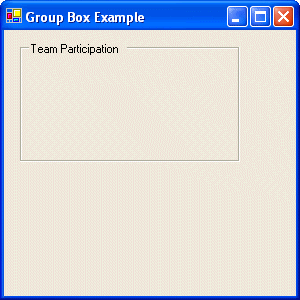
This is very simple to do in a Windows Application, but here I was needed to replicate the same in HTML. Well, I did a bit of research and found a very simple way to get a Group Box on the web.
The fieldset tag is used to group multiple elements together on a page and provide a caption for the grouping. The caption is supplied with the legend tag inside the fieldset.
So here's the simple code for it:
<fieldset style="width:100px;">
<legend>
Please Enter Your Name</legend>
<br>
<table>
<tr>
<td>First Name:</td>
<td><input type="text" /></td>
</tr>
<tr>
<td>Last Name:</td>
<td><input type="text" /></td>
</tr>
</table>
</fieldset>
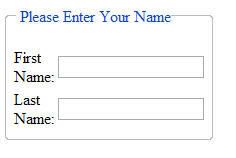
The output of the webpage is:
Friday, December 08, 2006
Freshers wanted at Tata Elxsi
 Tata Elxsi a premier MNC in Bangalore and part of the multi-billion Tata group has openings for Freshers from CSE / ECE / EEE or other related branches.
The only restriction is an aggregate score of 70% or more.
If you / your friends are interested, rush your resumes to jasonblr@gmail.com so that I can forward the same to my contacts.
About Tata Elxsi:
Tata Elxsi is a CMMi Level 5 certified company. It has diverse business interests ranging from Hardware & Software Development - Industrial Design & Mechanical Engineering - 3D Animation & Visual Effects to System Integration Services.
How to recover a boot failure in Windows Vista ?
 The Windows Recovery Environment is an automated customer support tool integrated into Windows Vista, designed to deal with boot failures. Windows RE automatically performs the tasks of a runtime environment, a diagnostic tool and a repair system, taking the user out of the debugging equation.
Microsoft has narrowed down a top consisting of five issues involved with a boot failure:
1) registry corruptions,
2) corrupt file systems (also known as NTFS metadata corruptions),
3) missing OS loader,
4) inaccessible boot devices (often caused by installing a bad storage driver) and
5) system file corruptions (some part of the OS getting deleted).
“These problems could happen because of hardware memory corruptions, disk corruptions, other hardware issues, buggy device drivers, or a kernel software issue. Regardless of how the system got into that state, the idea was to create an environment that would use heuristics to essentially implement a differential diagnosis to identify the issue and then use the resources in the other parts of the system configuration, combined with back-up data (such as system restore points) and a copy of key system image information to put the system back into an operating state -- without user intervention,” revealed Jim Allchin, Microsoft Co-President, Platform and Services Division.
Windows RE will launch automatically once it has detected a failed boot if it is already installed on a separate partition on the system, or it can be accessed via F8. Otherwise Windows RE can be launched manually via the Windows Vista DVD or the on-disk recovery environment.
“Once loaded, the Startup Repair starts checking for potential problems to see why the system failed to boot by grinding through the following questions: Is the problem a missing or damaged boot configuration file? Is the problem due to missing or damaged system files? Is it due to a missing or damaged driver? An incompatible driver? An incompatible OS update?” added Allchin.
Windows RE will attempt to resolve the problem alone as long as the issue is software related. The system will only report hardware malfunctions.
How to change the default Vista Logon Screen?
The style of the log on screen in Vista is just another example of an area overhauled in comparison with prior versions of the Windows operating system. But what happens if you are found of the logon screen in Windows XP and Windows 2000 to such an extent that this affinity cannot be cured by the Vista logon screen. What happens if you just want to go back. Can you?
Well, the answer is yes. But it is a partial yes, and you will understand this as we go along. But first take a deep breath and make peace with the old logon screen as it is gone for good. But, with Vista, Microsoft does permit a classic style logon screen.
This is possible via the Windows Local Security Policy Editor, or “secpol” tool. To launch the Local Security Policy Editor click start, Control Panel, System Maintenance, Administrative Tools, local Security Policy. Click “Continue” to the prompt presented by the User Account Control. If you are not presented with one, it's fine, just move on.
In the Local Security Policy editor you will see two panes, one on the left with tree-view navigation and one on the right which will have the actual definitions and items to edit. On the left hand side, expand (either by clicking on the arrow or double clicking) the "Local Policies" section, and then click on "Security Options". On the right hand side, scroll down until you see "Interactive logon: Do not display last user name". Double click on this entry and you will be presented with a dialog box that has two options - "Enabled" and "Disabled", with Disabled being selected as default. Change this setting to "Enabled", and then click on the OK button.
After double clicking “Interactive logon: Do not require CTRL+ALT+DEL” select the Disable option and hit OK. Next, close the Local Security Policy editor, as you are done. Log off. When you are prompted by a request to press CTRL-ALT-DEL do so, and you will get the classic style logon screen you have been labored so hard to achieve. I trust that you can return to the default Vista style logon screen by yourselves. What do you say folks!!
How to find details about a BSNL phone number?

Many a times you would want to know the details (Name / Address ) of the person who owns a BSNL phone. It's very simple now, just a few clicks away.
Head to BSNL Directory Search for Bangalore, and volla you have all the details. Truly the IT city rocks!! but privacy is of concern.
Bangalore Habba is back this year

Its 'Habba' (festival) time! The eight day long Bengalooru habba , now in its fourth year, has begun last Sunday. This annual festival, in the 50th anniversary year of Karnataka, promises to be special. All sorts of exhibitions, street plays, performances by artists from all over India aim to be featured! The aim is to showcase that Bengalooru (hmmm, gotta get used to this!) is a cultural city apart from being the IT industry's fav. city!
How Sweet can a Kid be?
mother in the doctor's office. He inquisitively asked the lady, "Why is
your stomach so big?"
She replied, "I'm having a baby." With big eyes, he asked, "Is the baby
in your stomach?"
She answered, "He sure is." Then the little boy, with a puzzled look,
asked, "Is it a good baby?"
She said, "Oh, yes. It's a real good baby."
With an even more surprised and shocked look he asked, "Then why did you
eat him?"


